 ExFlow
The Complete Guide to Self-Hosting Framer: Export Your Site Today

Framer has revolutionized how we design for the web. Its canvas-based approach and seamless animations make it a favorite for startups and designers alike. However, as your site grows, so do the costs. Framer’s hosting plans, while robust, can become a significant monthly expense, especially if you manage multiple projects. This is where the concept of self-hosting comes in. By learning how to export your Framer website, you can take full control of your code and host it on your own terms for a fraction of the price.

Why Consider Self-Hosting for Framer?
Hosting directly with Framer is convenient, but it locks you into their ecosystem. For many users, particularly those with high-traffic sites or multiple small projects, the "Framer Tax" can be quite high. Self-hosting offers a path to freedom.
- Significant Cost Savings: Instead of paying per-site fees to Framer, you can use affordable providers like Vercel, Netlify, or even your own S3 buckets. For agencies managing 10+ sites, the savings can reach thousands of dollars annually.
- Total Ownership: Once you export your files, you own the static assets. You aren't at the mercy of platform price hikes or service changes. If Framer ever changes its business model, your site remains safe.
- Performance Optimization: You can use your own CDN configurations to squeeze every millisecond of performance out of your site. Static sites serve faster, have lower Time to First Byte (TTFB), and are naturally more secure.
The Struggle with Traditional Export Methods (Why HTTrack Fails)
Many users attempt to use generic tools like HTTrack to download their sites. However, if you've ever tried this with Framer, you know it's a nightmare. Framer sites are complex React-based applications under the hood. They rely on dynamically loaded assets and heavy JavaScript execution to render animations.
HTTrack issues with Framer are the industry standard for frustration. You'll often find broken animations, missing scripts, and non-functional forms. This is because standard scrapers don't understand how to map the internal dependencies of a modern web app. You need a dedicated static framer downloader that understands the platform's architecture. This is where professional tools become essential for anyone serious about exporting a Framer website.

Introducing ExFlow: Your Professional Framer Exporter
ExFlow was built specifically to solve these problems. Unlike generic scrapers, ExFlow understands exactly how Framer, Webflow, and Squarespace package their sites. It ensures that every single animation, interaction, and styling element remains intact during the transition.
With ExFlow, you get a seamless bridge between high-end design and low-cost hosting. It handles the heavy lifting of gathering nested CSS, obfuscated JS files, and high-resolution media, packaging them into a ready-to-deploy bundle.
Core Features of ExFlow:
- Complete Site Export: All pages, including CMS-like dynamic content, are bundled into a clean ZIP folder.
- Badge Removal: Remove the "Made in Framer" badge for a professional, white-label look without paying for the Pro hosting tiers.
- Sync Capabilities: Automated exports to Git, S3, or FTP to keep your live site updated without manual uploads.
Technical Deep Dive: Handling Forms and Performance
One of the most common questions when moving away from Framer hosting is: "How do I handle my contact forms?" Since Framer's native forms rely on their backend, a static export needs an alternative. Using ExFlow, you can easily integrate third-party services like Formspark, Getform, or even custom logic via BuildShip. By injecting a small snippet of custom code during the export process, your forms remain functional and more flexible than ever.
Performance-wise, while Framer uses a global CDN, self-hosting on platforms like Cloudflare Pages or Amazon S3 can offer even more granular control. Cloudflare Pages, for instance, provides edge caching that significantly reduces loading times for international users. By combining the sleek design of Framer with the raw power of Cloudflare's infrastructure, you achieve a level of optimization that outclasses standard managed hosting.
How to Export Your Framer Site with ExFlow
The process is designed to be as simple as possible. You don't need to be a developer to get professional results. Follow these steps to take your site offline and onto your own servers:
1. Input Your URL
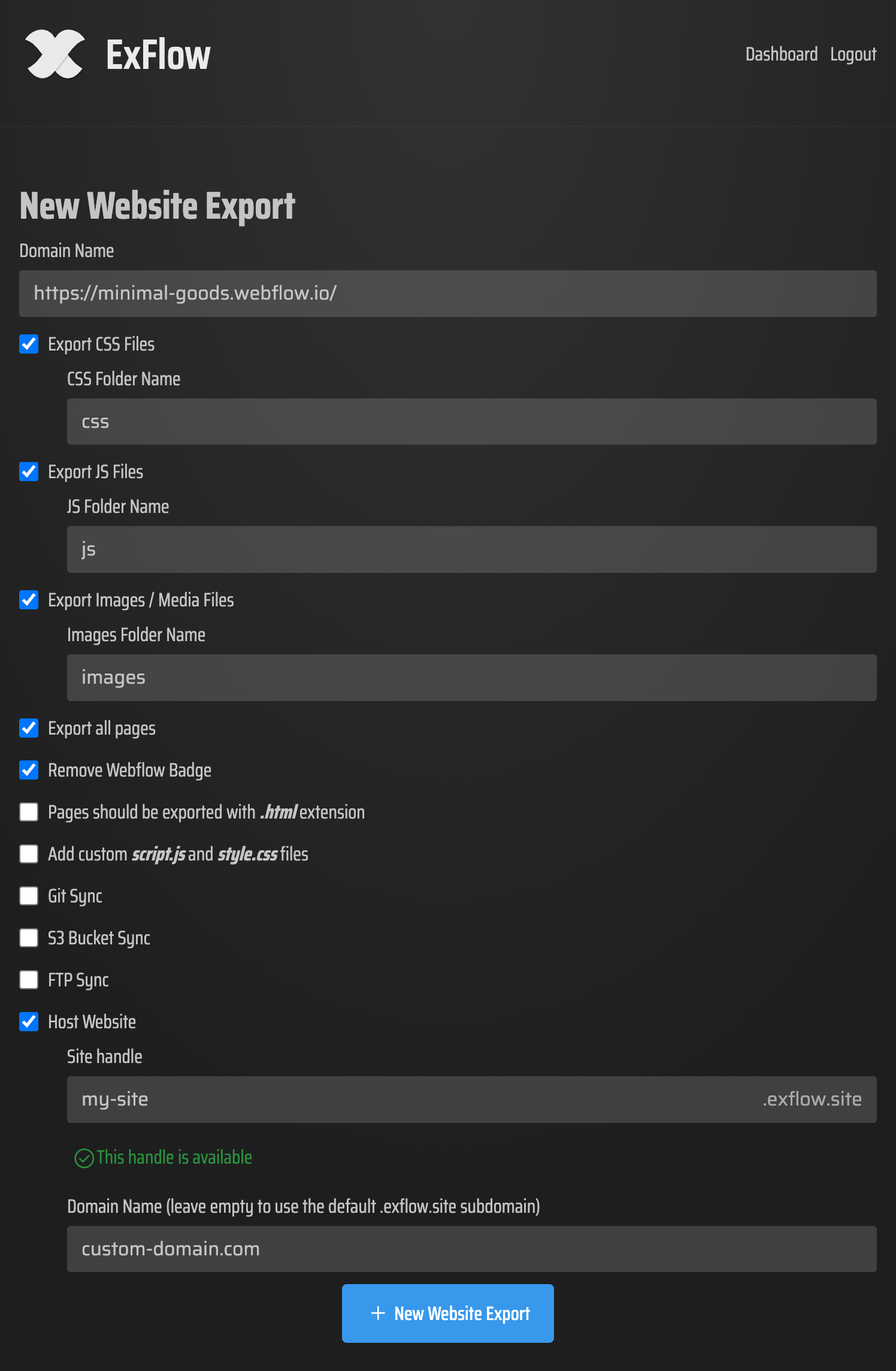
Start by visiting ExFlow and entering the domain of your Framer site. The tool will analyze the structure and prepare the asset manifest.
2. Configure Your Settings
ExFlow gives you granular control. You can toggle the removal of the platform badge, choose whether to export all pages or just specific ones, and even inject custom style.css or script.js files to enhance your site post-export.
3. Initiate the Export
The engine will crawl your site, capturing all animations and media. Once finished, you'll have a clean directory structure containing everything needed for self-hosting Framer.
4. Choose Your Hosting Destination
You have several paths forward once you have your files:
- ExFlow Hosting: Link your domain directly to ExFlow’s unlimited hosting platform for the easiest setup.
- GitHub & Vercel: Use the Git Sync feature to push your export to a repository, triggering an automatic deployment on Vercel or Netlify.
- Amazon S3: For massive scalability at pennies on the dollar, sync your site directly to an S3 bucket.
Maximizing SEO for Your Exported Site
One common concern is whether exporting a Framer website hurts SEO. In reality, it can help. Static sites generated by ExFlow are incredibly fast. Search engines like Google prioritize site speed as a major ranking factor. By self-hosting, you eliminate the overhead of Framer’s dynamic rendering on every request, leading to better search performance.
Furthermore, by having access to the raw HTML, you can manually fine-tune your meta tags, structured data, and alt attributes in ways that are sometimes limited within a drag-and-drop editor. Combine this with the ability to host on your own high-performance CDN, and you have a recipe for search dominance.
Conclusion
Stop overpaying for hosting that you can manage yourself. Whether you're looking for a backup for your Squarespace site or a way to drastically reduce your Framer monthly overhead, ExFlow is the ultimate solution. It’s the reliable, professional-grade alternative to broken tools and expensive platform lock-ins.
Don't let your design be trapped by expensive hosting plans. Take control of your web presence, optimize your costs, and enjoy the freedom of the open web.