 ExFlow
Can You Export a Framer Website? (Yes — Here’s How)

Can You Export a Framer Website? (Yes — Here’s How)
Framer has taken the design world by storm, offering a powerful platform for creating beautiful and interactive websites. However, like many website builders, the question of "Can you export a Framer website?" often arises, especially when considering long-term hosting flexibility or the desire to own your site's code. The good news is: Yes, you can export a Framer website, and this guide will show you how, ensuring you retain full control over your digital assets.
Why Export Your Framer Website?
Before diving into the 'how,' let's explore the 'why.' Several compelling reasons might drive you to export your Framer site:
- Cost Savings: Framer's hosting plans, while convenient, can become a significant expense, particularly for growing businesses or those with simpler needs. Exporting allows you to leverage more affordable third-party hosting solutions.
- Data Ownership & Portability: Having a downloadable static version of your website means you truly own your content and code. This provides peace of mind and flexibility for future migrations or integrations.
- Control Over Hosting Environment: Exporting grants you complete control over your hosting. You can integrate with specialized services, optimize for specific performance needs, or simply choose a provider that better suits your budget and technical requirements.
- Offline Backup: A static export serves as a crucial backup, ensuring your website's data is safe even if the original platform experiences issues.
- Avoiding Vendor Lock-in: Relying solely on a platform's proprietary system can lead to vendor lock-in. Exporting your site mitigates this risk, giving you the freedom to move your site elsewhere without starting from scratch.
The Challenge: Framer's Export Capabilities
While Framer offers a seamless design experience, its native export functionality for full static site downloads can be less straightforward than some users might expect. Unlike platforms that offer one-click static exports for all assets, Framer's approach often requires specific tools or methods to capture the complete website – including all pages, assets, and code.
This is where dedicated tools like ExFlow come into play. They are designed to overcome the limitations of native exporters, ensuring that every part of your website is captured accurately for self-hosting.
How to Export Your Framer Website with ExFlow
ExFlow is your powerful ally in extracting your Framer website into a downloadable static package. It's built to handle the intricacies of platforms like Framer, ensuring a complete and functional export. Here’s how to use it:
- Visit ExFlow: Navigate to ExFlow.site.
- Enter Your Framer Site URL: Input the live URL of your Framer website into the provided field. ExFlow will then analyze your site.
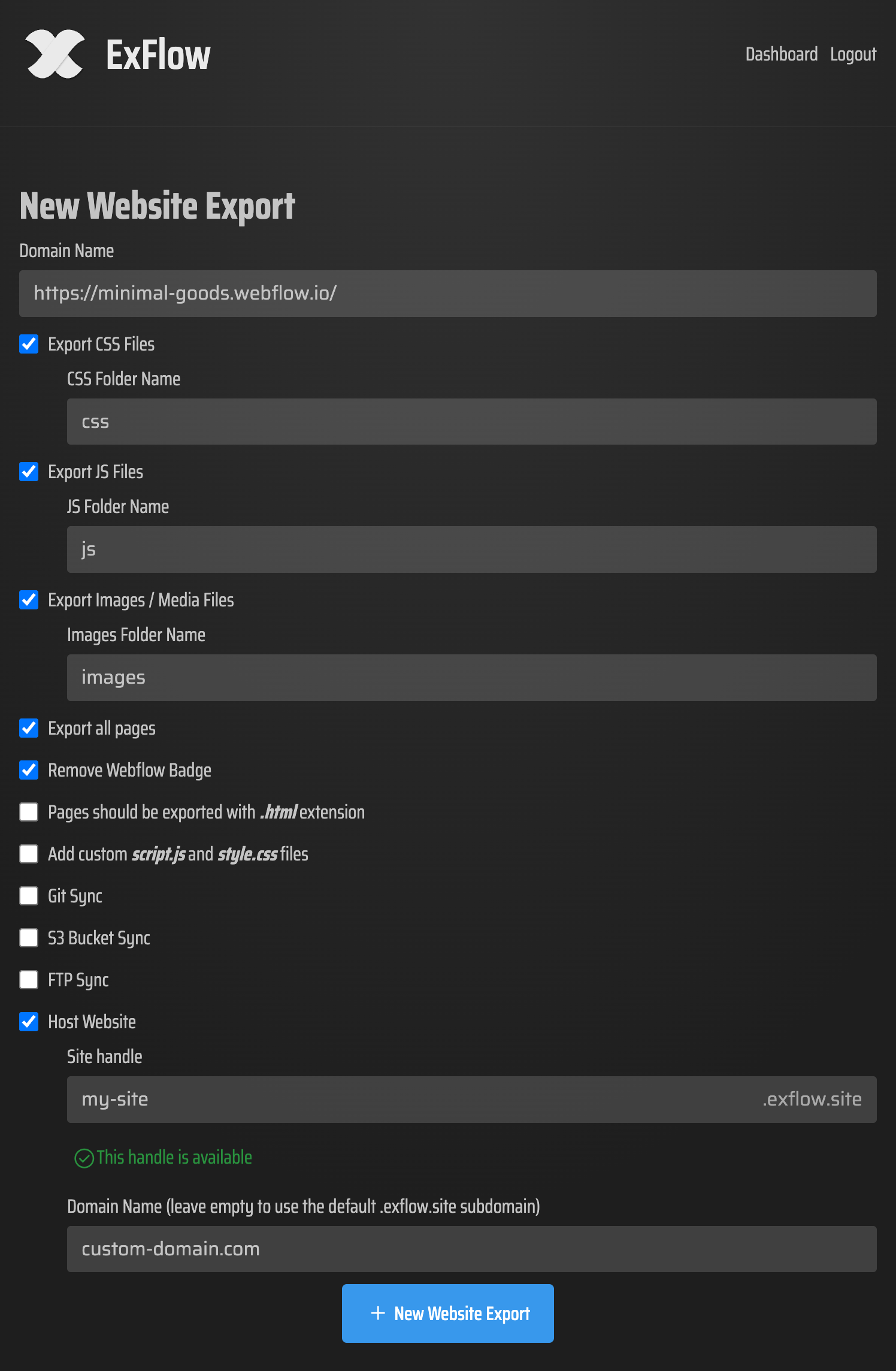
- Customize Export Settings: ExFlow offers several options to tailor your export:
- Pages: Choose to export all pages, ensuring no content is left behind. This is crucial for sites with dynamic content or multiple landing pages.
- Assets: Select options to export CSS files, JavaScript files, and all images/media assets.
- Remove "Made with" Badge: ExFlow allows you to remove any platform-specific badges, giving your exported site a clean, professional look.
- Sync Options: For advanced users, ExFlow supports syncing your exported files directly to Git, S3, or FTP, streamlining the deployment process.
- Initiate the Export: Once your settings are configured, start the export process. ExFlow will meticulously gather all your website's components.
- Download Your Website: After the export is complete, you'll receive a ZIP file containing all your website's HTML, CSS, JavaScript, and media files. This package is now ready for self-hosting.
Image: ExFlow export configuration example
Why ExFlow is Different (and Better than HTTrack for Framer)
Tools like HTTrack have been around for a long time, but they often struggle with modern, JavaScript-heavy platforms like Framer. HTTrack works by crawling a website like a search engine, which can lead to:
- Broken Exports: Incomplete HTML, missing CSS, or non-functional JavaScript.
- Missing Assets: Images, fonts, or other media files not being downloaded correctly.
- Dynamic Content Issues: Problems with exporting data that relies on the platform's internal systems.
ExFlow, on the other hand, is purpose-built for platforms like Framer. It understands the structure and dependencies of these sites, leading to:
- Complete and Accurate Exports: All pages, styles, scripts, and assets are captured.
- Functional Code: The exported code is designed to run standalone without relying on Framer's live environment.
- Ease of Use: A streamlined process that avoids the technical hurdles often associated with generic downloaders.
Hosting Your Exported Framer Website
Once you have your exported static files, you have a multitude of hosting options. ExFlow itself offers a simple and cost-effective hosting solution, but you can also choose other providers:
- ExFlow Hosting: For ultimate simplicity, ExFlow provides integrated hosting. You can link your custom domain directly through ExFlow, and they handle the rest. This is an excellent option for those who want a hands-off approach.
- Cloud Hosting Providers (AWS S3, Google Cloud Storage, etc.): For greater control and scalability, cloud storage services are ideal. You can upload your exported files and configure static website hosting through their dashboards. ExFlow's sync features can automate this upload process.
- Traditional Web Hosting (FTP): If you have a standard web hosting account, you can use FTP to upload your exported files. ExFlow's FTP sync feature can manage this transfer for you.
- Static Site Hosting Platforms (Netlify, Vercel, GitHub Pages): These platforms are optimized for static sites and offer features like CDN, CI/CD, and custom domains. You can connect your exported files (often via Git sync) to these services.
Image: Abstract representation of website data transfer

Conclusion
Exporting your Framer website is not only possible but also a strategic move for greater control, cost savings, and data ownership. Tools like ExFlow simplify this process significantly, offering a reliable way to download your entire site as static files. By understanding the 'why' and the 'how,' you can confidently take your Framer creations anywhere you want to host them, ensuring your digital presence is truly yours.
Ready to take control of your Framer website? Try ExFlow today and experience seamless website exporting and hosting.