 ExFlow
How to Export a Framer Website for Free (and Host it Anywhere)
Framer has emerged as a powerful design tool, allowing creators to build stunning and interactive websites with ease. However, as your project grows or your needs change, you might find yourself looking for more control over your website's hosting or wanting to avoid ongoing subscription fees. Fortunately, exporting your Framer website and hosting it independently is not only possible but also a smart way to save money and gain flexibility. This guide will walk you through the process using ExFlow, a tool designed to make exporting and self-hosting your Framer site a breeze.
Why Export and Self-Host Your Framer Website?
While Framer offers a robust platform for website creation and hosting, there are several compelling reasons why you might consider exporting your site:
-
Cost Savings: Framer's hosting plans, like many other website builders, can add up over time. Exporting your site and utilizing more affordable hosting solutions or even free options can significantly reduce your overhead costs. This is especially beneficial for personal projects, small businesses, or sites with lower traffic.
-
Greater Control and Flexibility: Self-hosting gives you complete control over your website's environment. You can integrate custom tools, manage your server configurations, and have direct access to all website files. This flexibility is crucial for complex projects or when you need to integrate with other services not natively supported by Framer.
-
Portability and Ownership: By exporting your site, you ensure you have a static backup of your work. This portability means you're not locked into a single platform and can move your website to any hosting provider or even archive it for future use.
-
Performance Optimization: Sometimes, self-hosting allows for more granular performance optimizations that might not be available through a platform's default hosting. You can fine-tune server settings, implement custom caching strategies, and ensure your site loads as quickly as possible.
Understanding the Challenge: Why Generic Tools Often Fail
Before diving into ExFlow, it's important to understand why generic website downloaders like HTTrack can often struggle with modern website builders like Framer. These tools are designed to crawl websites like a search engine bot, downloading HTML, CSS, and images. However, they often fail to correctly interpret the complex JavaScript, dynamic content, and unique build processes of platforms like Framer. This can result in broken layouts, non-functional interactions, missing CMS data, and ultimately, a website that cannot be properly hosted.
ExFlow, on the other hand, is specifically built to understand the intricacies of platforms like Framer. It's not a generic crawler; it's a specialized exporter that knows how to package all the necessary components of your Framer site, ensuring a clean and functional export.
How to Export Your Framer Website with ExFlow
ExFlow simplifies the process of exporting your Framer website, making it accessible even for those without extensive technical expertise. Here’s a step-by-step guide:
-
Visit ExFlow: Navigate to ExFlow.site.
-
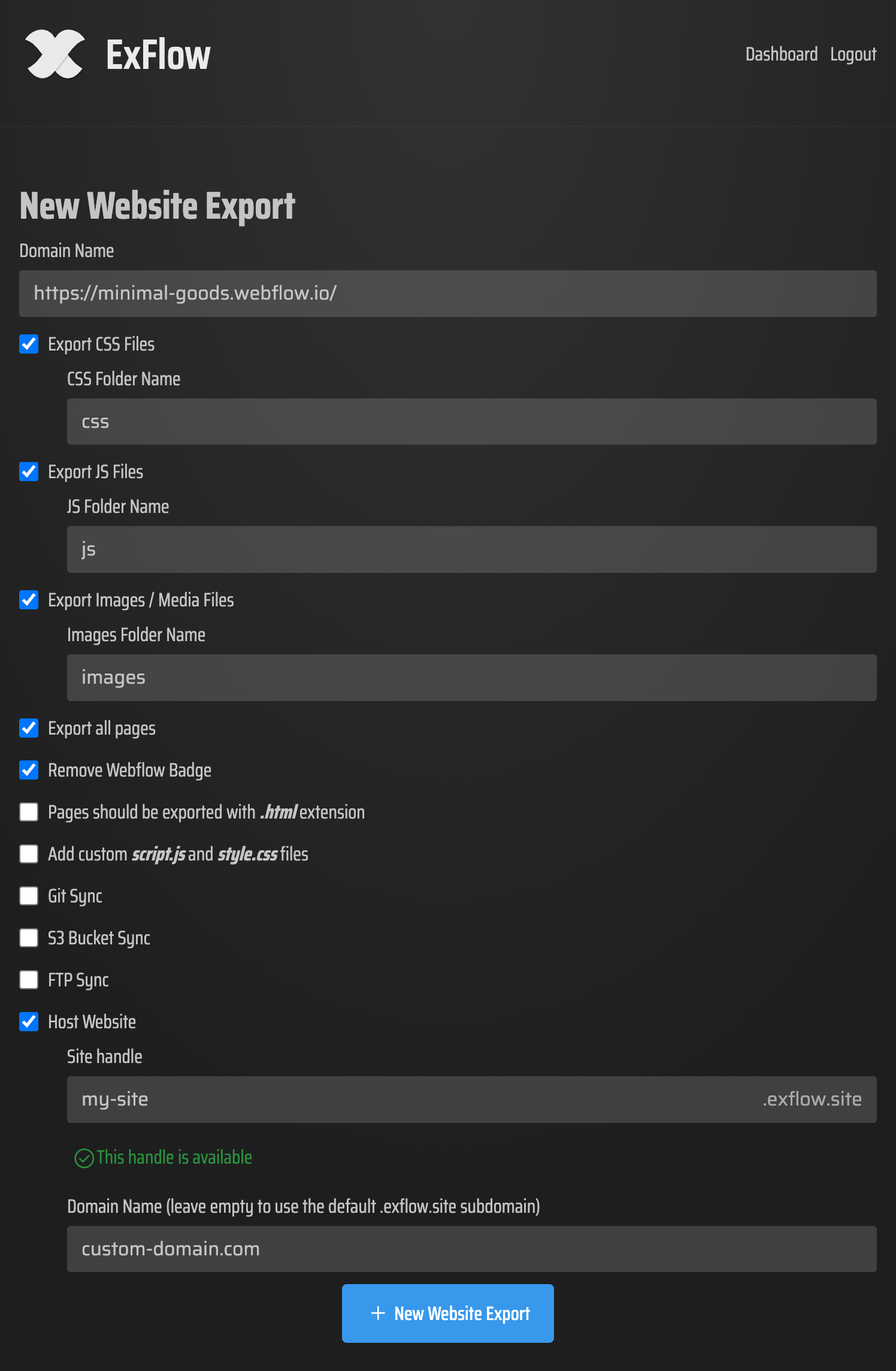
Enter Your Framer Site URL: In the provided field, enter the URL of your live Framer website. ExFlow will use this to access and analyze your site.
-
Customize Export Settings: ExFlow offers several options to tailor your export:
- Export All Pages: Ensure this is selected to capture your entire website, including all static pages and potentially CMS content if structured correctly.
- Export CSS Files, JS Files, Images/Media: These are crucial for your website's functionality and appearance. Make sure they are all included.
- Remove "Made with" Badge: If you want a completely clean export without any platform branding, enable this option.
- Add Custom Scripts/Stylesheets: For advanced users, you can include your own additional CSS or JavaScript files.
- Sync Options (Git, S3, FTP): ExFlow can directly sync your exported files to various platforms, which we'll discuss later.
-
Initiate the Export: Once your settings are configured, start the export process. ExFlow will analyze your Framer site and compile all the necessary files into a downloadable package.
-
Download Your Exported Site: After the export is complete, you'll typically receive a ZIP file containing all your website's HTML, CSS, JavaScript, and media assets. This package is now ready for self-hosting.
Hosting Your Exported Framer Website
With your Framer site successfully exported, you have multiple options for hosting it:
1. Hosting on ExFlow's Servers
For ultimate simplicity, ExFlow offers integrated hosting. This is an excellent option if you want a hassle-free experience without managing server configurations. During the export process, you can opt for ExFlow's hosting. You can also link your custom domain name directly to your hosted site, making it appear as if it were hosted traditionally.
- Pros: Easiest setup, managed by ExFlow, unlimited bandwidth, custom domain support.
- Cons: May have limitations based on ExFlow's subscription plans (e.g., max export size, number of exports).
2. Hosting with Amazon S3
Amazon S3 is a popular, cost-effective, and highly scalable solution for hosting static websites. ExFlow's direct S3 sync feature makes this process straightforward.
- Steps:
- Configure an S3 bucket in your AWS account for static website hosting.
- Use ExFlow's S3 sync option, providing your AWS credentials. ExFlow will upload the exported files directly to your bucket.
- Ensure your S3 bucket is correctly configured for website hosting (e.g., setting the index document).
- Pros: Highly scalable, very cost-effective for static sites, reliable.
- Cons: Requires an AWS account and some understanding of S3 configuration.
3. Hosting with Git (GitHub Pages, GitLab Pages, etc.)
If you use Git for version control, ExFlow can sync your exported files directly to a Git repository. You can then use services like GitHub Pages to host your site for free.
- Steps:
- Connect your Git repository credentials within ExFlow.
- ExFlow pushes the exported files to your chosen repository.
- Configure your Git provider (e.g., GitHub Pages) to deploy your site from the repository.
- Pros: Free hosting options available, excellent version control, easy collaboration.
- Cons: May have limitations on file size or complexity depending on the Git hosting service.
4. Hosting with FTP
For users with existing web hosting that supports FTP, ExFlow's FTP sync is a convenient way to upload your exported files.
- Steps:
- Provide your FTP server details (host, username, password) to ExFlow.
- ExFlow will automatically upload your site files to the specified server directory.
- Pros: Works with most traditional web hosting providers.
- Cons: Requires manual configuration of FTP credentials, can be slower for large sites compared to S3 or Git sync.
SEO Keywords to Consider:
When optimizing your blog post for search engines, focus on keywords that potential users are searching for. Here are some suggestions:
export framer website freeframer website downloaderself-host framer siteframer static site exportalternative to framer hostingtransfer framer websitedownload framer website filesbest framer exporter
Conclusion
Exporting your Framer website with ExFlow is a powerful strategy for gaining more control, saving costs, and increasing the portability of your online presence. Whether you choose the simplicity of ExFlow's integrated hosting, the scalability of Amazon S3, the version control benefits of Git, or the familiarity of FTP, you can successfully take your Framer site wherever you need it to go. By leveraging tools like ExFlow, you unlock a new level of freedom in managing your digital creations.
Ready to export your Framer website? Visit ExFlow.site to get started!