 ExFlow
Squarespace Hosting Too Expensive? Here’s How to Self-Host and Save
Squarespace is undeniably one of the most popular website builders on the market today. Its sleek templates and intuitive drag-and-drop interface make it a go-to choice for creatives, small businesses, and entrepreneurs. However, as your site grows, you might find that the monthly subscription starts to eat into your budget. If you've ever thought, "Squarespace hosting is expensive," you're certainly not alone.
In this guide, we’re going to look at the current landscape of Squarespace pricing, its limitations, and how you can break free from the recurring monthly fee by self-hosting your site using ExFlow.
The Real Cost of Squarespace in 2025
While Squarespace offers a beautiful design experience, it comes at a premium. As of 2024-2025, the entry-level Personal Plan starts at $16 per month (when billed annually). For many, this is where the trouble begins.

At $16/month, you are locked out of several critical features:
- No Custom Code: You cannot add custom CSS or JavaScript, which severely limits your ability to truly customize your site's functionality.
- Basic Analytics only: You get the bare minimum data about your visitors.
- No E-commerce: You can't sell a single product.
Stepping up to the Business Plan ($23/month) solves the code issue but introduces a 3% transaction fee on all sales. If your store does $5,000 in sales, Squarespace takes $150 on top of your monthly subscription. For many growing brands, this model simply isn't sustainable.
Why Self-Hosting Squarespace is the Smart Move
Self-hosting (or hosting on a static platform) isn't just about saving $200+ a year. It's about ownership and performance. When you host your site independently, you gain:
- Zero Transaction Fees: You keep every cent of your sales (minus your payment processor like Stripe).
- Infinite Customization: No more "Personal Plan" restrictions. You have the full HTML/CSS/JS files.
- Better SEO and Speed: Static files load significantly faster than heavy dynamic builders. Search engines love fast-loading sites.
- Backup Security: Instead of your data living exclusively on Squarespace's servers, you have a complete backup Squarespace export on your own drive or cloud.
Introducing ExFlow: The Ultimate Squarespace Exporter
If you've tried tools like HTTrack in the past, you know they often struggle with modern, animation-heavy platforms like Squarespace and Framer. You end up with broken scripts, missing images, and a site that looks like it was built in 1995.
ExFlow was built specifically to solve this. It is a precision tool designed to mirror your site exactly, capturing every interaction, animation, and image. Unlike generic scrapers, ExFlow understands the architecture of Squarespace, ensuring that what you see on the builder is exactly what you get in your export.
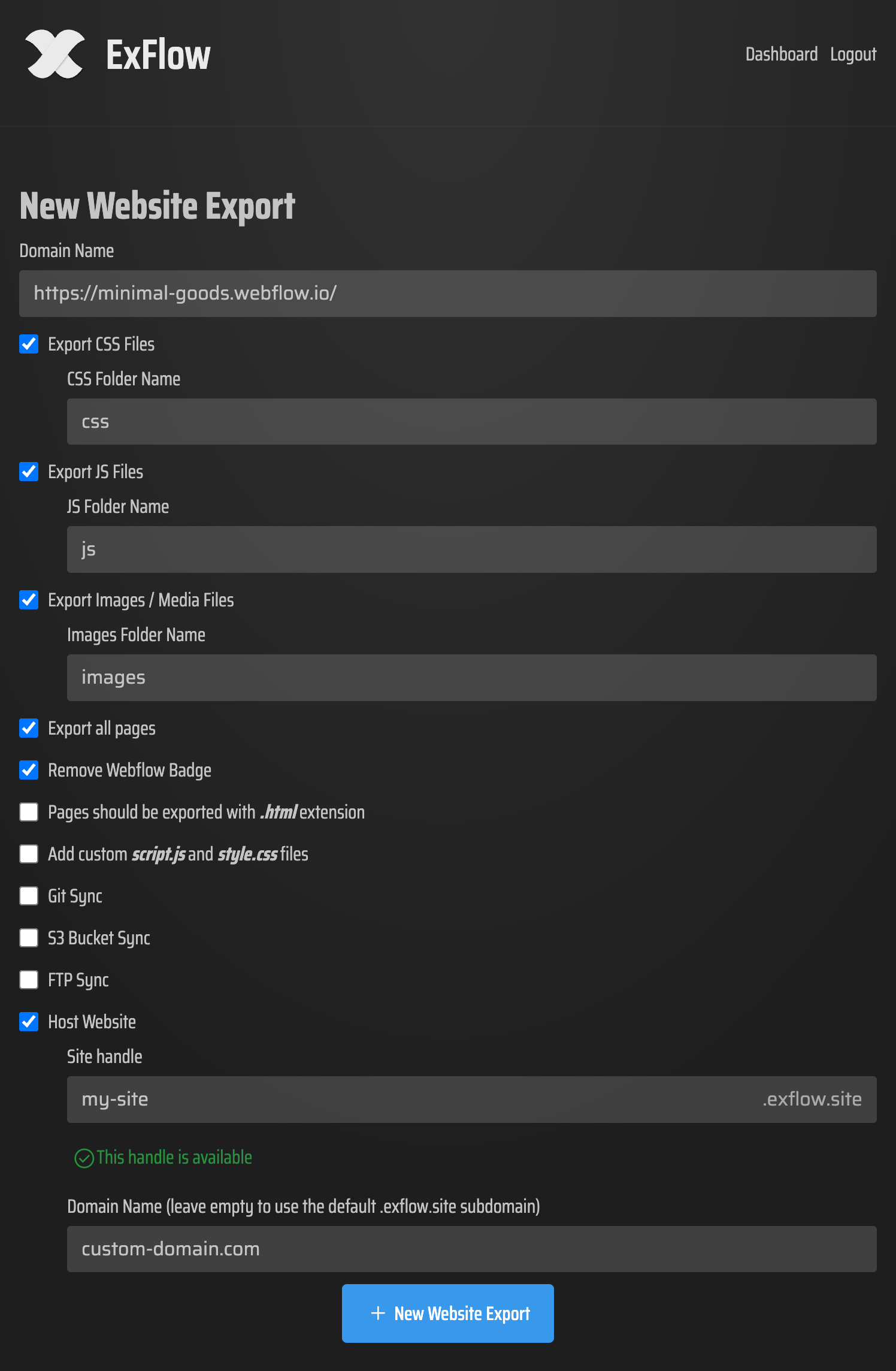
Key Features of ExFlow:
- Full Site Export: Includes all pages, CSS, JS, and high-res images.
- Badge Removal: Say goodbye to the "Made with Squarespace" footer without paying for the top-tier plan.
- Automatic Syncing: Connect directly to GitHub, S3, or FTP.
- Built-in Hosting: ExFlow offers its own unlimited, inexpensive hosting if you don't want to manage a server yourself.
Step-by-Step: How to Self-Host Your Squarespace Site
Transitioning away from Squarespace hosting doesn't require a degree in computer science. Here is how you do it with ExFlow:
1. Enter Your URL
Go to the ExFlow dashboard and enter your Squarespace domain. If your site is password-protected, don't worry—ExFlow can handle that as long as you provide the credentials.
2. Configure Your Export
Choose which assets to include. We recommend selecting:
- Export All Pages
- Export CSS and JS Files
- Export Images / Media Files
- Remove "Made with" Badge
3. Choose Your Destination
ExFlow gives you several ways to host your new static site:
Option A: ExFlow Hosting (Easiest) Just toggle the "Hosting" switch. ExFlow will host your static files on its optimized servers. You get unlimited bandwidth and can link your custom domain in seconds.
Option B: GitHub / Netlify / Vercel Sync your export directly to a Git repository. This is perfect for developers who want a CI/CD pipeline for their Squarespace content.
Option C: Amazon S3 or FTP For those who want total control, ExFlow can push your files directly to an S3 bucket or your own traditional web server via FTP.

The Verdict: Is it Worth It?
If you are paying $200-$300 a year for a site that doesn't change often, or if you are feeling restricted by the lack of custom code on cheaper plans, self-hosting squarespace is a no-brainer. You get a faster site, lower costs, and complete control over your digital assets.
Ready to stop overpaying for hosting? Try ExFlow today and see how easy it is to take your site with you.
Useful Resources
If you're also using Webflow or Framer, check out these video guides on how ExFlow handles other platforms: