 ExFlow
The Ultimate Guide to Downloading Your Framer Website for Offline Use

Framer has transformed from a prototyping tool into a powerful website builder used by startups and designers worldwide. However, the convenience of a SaaS builder comes with a hidden cost: platform lock-in. As your project grows, you might find yourself asking, "How do I download my Framer website for offline use?" or "Can I host this myself to save on monthly costs?"
In this comprehensive guide, we'll dive deep into the world of Framer exports. We'll look at the technical hurdles that make standard scrapers fail, explore why many users find webflow hosting is expensive and want similar portability for Framer, and ultimately, how to use a static framer downloader like ExFlow to regain control.

The Growing Need for Portability
In the modern web ecosystem, ownership is becoming a rare commodity. When you build on platforms like Framer or Squarespace, you aren't just paying for a design tool; you're paying for their infrastructure. While this is great for getting started, it creates a "black box" around your data.
Why would you want to download your site?
- Offline Archiving: For compliance or peace of mind, having a version of your site that exists independently of a server is vital.
- Local Development: Testing new scripts or styles locally before deploying.
- Cost Management: Comparing Framer’s hosting to self-hosting options often reveals that you can save hundreds of dollars a year.
- Platform Agnostic Backups: Just as you would backup squarespace or Webflow, having a static export is the best insurance policy.
Why HTTrack and Generic Scrapers Often Fail
For decades, HTTrack has been the go-to utility for mirroring websites. However, the modern web has moved beyond the simple HTML/CSS structures HTTrack was built for. Framer websites are essentially React applications. They rely on complex hydration processes, dynamic asset loading, and client-side routing.
When you try to use generic tools, you frequently encounter httrack issues with framer. These include:
- Broken Animations: Framer’s sophisticated interactions often break when the underlying JavaScript is not captured correctly.
- Missing Assets: Media files stored on CDNs with dynamic paths often go missing.
- Broken Layouts: If the CSS isn't mapped perfectly to the generated HTML, the site looks like a "broken export."
This is why many developers who try to download webflow site content or export Framer pages end up frustrated. You need a tool that speaks the language of these platforms.

Introducing ExFlow: Your Ultimate HTTrack Alternative
ExFlow was built specifically to solve the "locked-in" problem for the big three: Webflow, Squarespace, and Framer. Unlike a blind crawler, ExFlow understands how these platforms structure their data. It doesn't just "scrape"; it intelligently exports.
Key Features of ExFlow:
- High-Fidelity Code: Your exported site looks and behaves exactly like the original.
- CMS Support: Unlike standard exporters, ExFlow can handle dynamic pages and CMS-driven content.
- One-Click Sync: Why manually upload files when you can sync directly to Amazon S3, GitHub, or FTP?
- Unlimited Bandwidth Hosting: If you want to leave the expensive hosting plans behind but don't want the headache of server management, ExFlow provides its own cost-effective hosting.
Step-by-Step: Exporting Your Framer Website
Getting your site offline with ExFlow is a simple process:
- Submit Your URL: Go to ExFlow and enter your site’s domain.
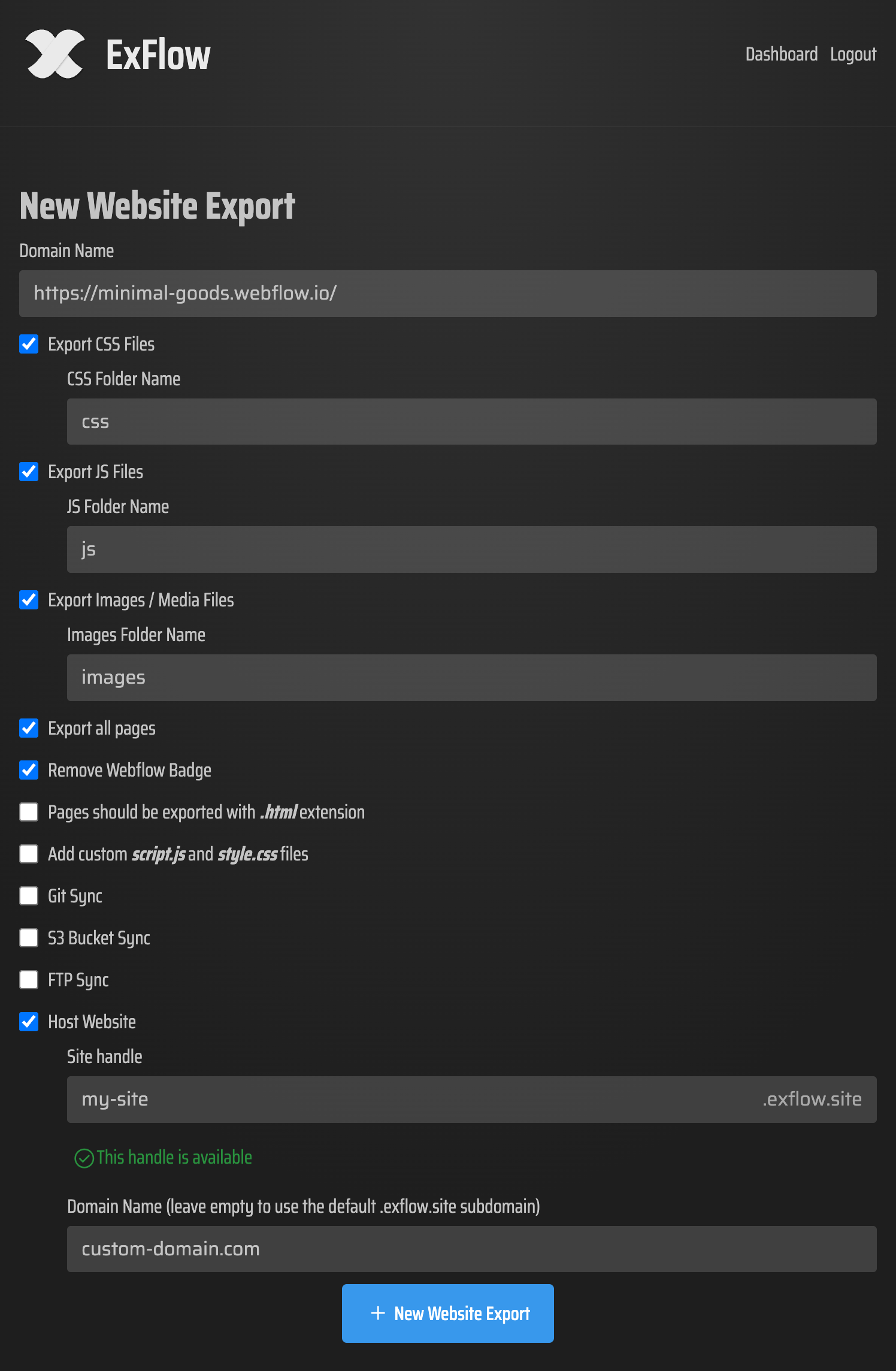
- Configure Your Export: This is where the magic happens. You can choose to:
- Export all CSS and JS files.
- Remove the "Made in Framer" badge.
- Set up folder structures for images.
- Add custom scripts for analytics or tracking that you might want to include in your self-hosted version.
- Choose Your Destination: You can download a clean .zip folder or set up an automatic sync to your favorite provider.
The Strategic Value of Self-Hosting
Once you have your export, the world is your oyster. Many of our users choose to host their exported sites on platforms like Cloudflare Pages or Vercel. This not only improves performance through edge caching but also eliminates the recurring "per-site" fees that make traditional builders expensive.
If you are coming from a background where webflow hosting is expensive, you’ll find that a static site approach is significantly lighter on your wallet. This is true whether you are looking to export framer website projects or simply seeking a better way to backup squarespace assets.

Conclusion: Take Control of Your Design
Your website is your intellectual property. You shouldn't be limited by the platform you chose to design it in. By using ExFlow, you get the best of both worlds: the incredible design power of Framer and the freedom of the open web.
Whether you need a static framer downloader for a single project or a robust system to manage multiple webflow site exports, ExFlow is here to help. Start your journey toward website independence today and see how easy it is to take your designs wherever you go.
Visit ExFlow.site to start your first export for free.