ExFlow
Host Your Webflow Website on GitHub Pages for Free with ExFlow

Webflow is widely recognized as one of the most powerful visual website builders on the market today. Its ability to create complex animations and pixel-perfect designs is unmatched. However, as many users quickly discover, the cost of keeping a site live on Webflow's servers can be a significant hurdle. With hosting plans often starting at $14–$23 per month per site, the annual cost adds up fast—especially for small businesses, portfolios, or landing pages that don't necessarily need a high-end dynamic backend.
But what if you could keep the design power of Webflow without the recurring hosting fees? The answer lies in static hosting, and specifically, hosting on GitHub Pages. In this guide, we will show you how to host your Webflow website on GitHub Pages for free using ExFlow, the ultimate tool for Webflow exports.

Why Move Your Webflow Site to GitHub Pages?
Before we dive into the "how," let’s talk about the "why." As we discussed in our previous post on why Webflow hosting is too expensive, the premium pricing isn't always justified for static sites.
GitHub Pages offers a robust, globally distributed, and—most importantly—completely free hosting solution for static websites. By exporting your site as raw HTML, CSS, and JavaScript, you gain:
- Zero Hosting Costs: You only pay for your domain name (and even that is optional with a .github.io subdomain).
- Ultimate Performance: Static files are served via a CDN, making your site incredibly fast.
- Total Control: You own your code. You can version it, backup your Webflow site locally, and move it to any server at any time.
The Challenge: Webflow’s Native Export Limits
Webflow does provide a built-in export feature, but it comes with strings attached. First, you need a paid workspace plan just to access the export button. Second, Webflow’s native exporter excludes CMS content. If you have a blog or a portfolio built with the Webflow CMS, those pages simply won't be in your export folder.
This is where ExFlow changes the game. Unlike the native exporter, ExFlow allows you to export your entire site—including all CMS pages—without needing a high-tier Webflow plan. It’s a complete solution that handles everything from badge removal to image optimization.

Step-by-Step Guide: Hosting on GitHub Pages
Step 1: Export Your Site with ExFlow
First, you need your site files. Traditional methods like using HTTrack often fail with Webflow’s modern architecture. As we’ve noted in our comparison of HTTrack alternatives, specialized tools are necessary for a clean export.
- Go to ExFlow.site.
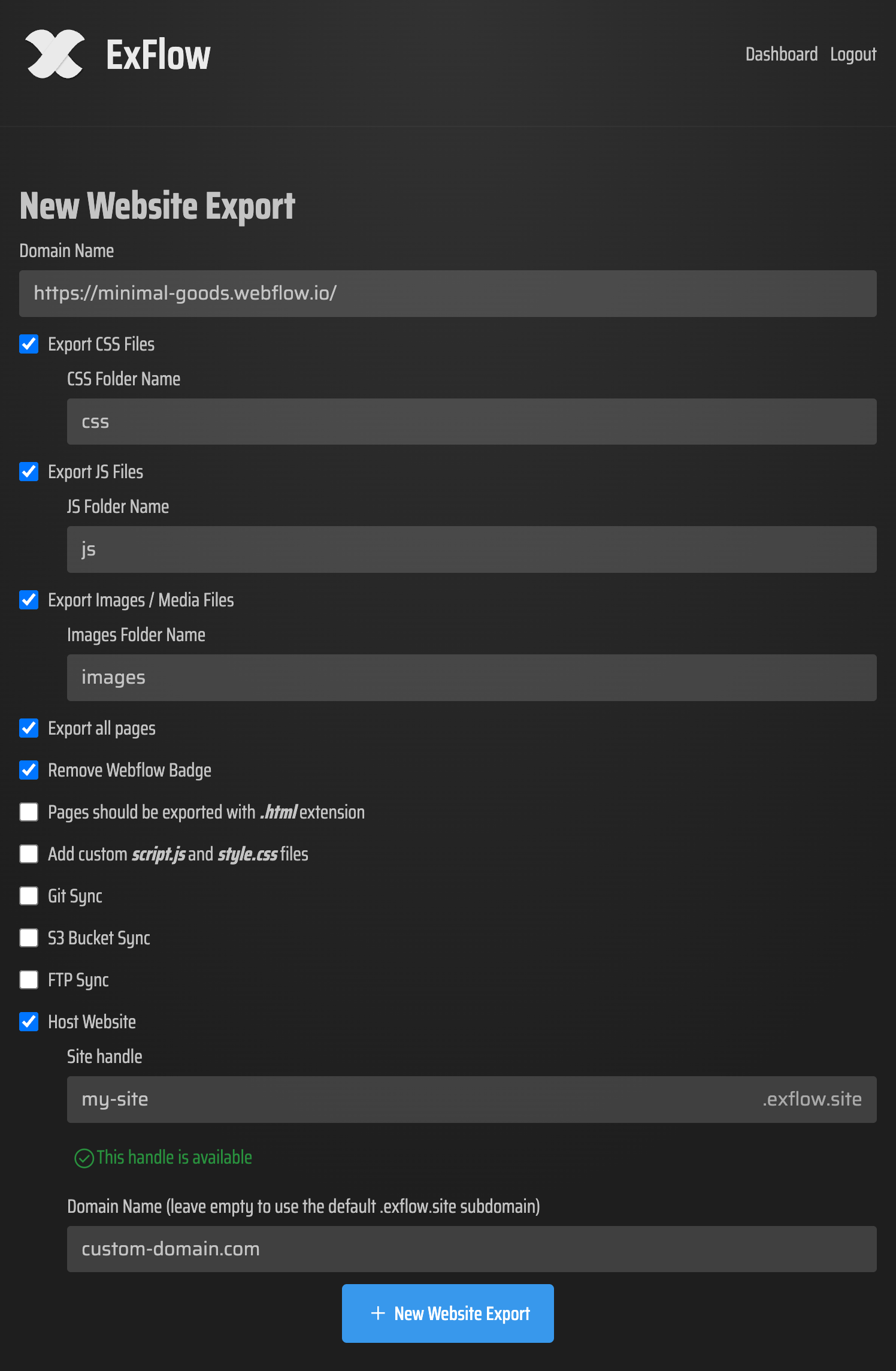
- Enter your Webflow site URL.
- Configure your settings: Ensure "Export All Pages" and "Remove Made with Webflow Badge" are checked.
- Run the export and download the ZIP file.
Step 2: Create a GitHub Repository
If you don't have a GitHub account, sign up for free at GitHub.com.
- Create a new repository.
- Name it
yourusername.github.io(replaceyourusernamewith your actual GitHub username). - Set the repository to Public.
- Initialize it with a README (optional).
Step 3: Upload Your Files
Once your repository is ready, it's time to move your Webflow files there.
- Unzip the folder you received from ExFlow.
- In your GitHub repository, click Add file > Upload files.
- Drag and drop all the files (HTML, CSS, JS, and the
imagesfolder) from your local computer into the GitHub browser window. - Click Commit changes.

Step 4: Activate GitHub Pages
Usually, naming your repo username.github.io activates the site automatically. To verify:
- Go to Settings in your repository.
- Click on Pages in the left-hand sidebar.
- Ensure the source is set to "Deploy from a branch" and the branch is set to
main(ormaster). - Your site should be live at
https://yourusername.github.iowithin a few minutes!
Automating the Process with ExFlow
While manual uploading works, ExFlow offers an even better way: Git Sync.
By using the built-in Sync feature in ExFlow, you can connect your GitHub account directly. Every time you trigger an export, ExFlow will automatically push the updated code to your GitHub repository. This means your GitHub Pages site stays in perfect sync with your Webflow design without you ever having to manually upload a file again.
Check out this video on how to sync Webflow with GitHub: https://www.youtube.com/watch?v=Zvw0qiUKBYk
What About Features That Break?
When you move to a static host like GitHub Pages, certain Webflow features that rely on their servers (like native forms or site search) will stop working. However, this is easily solved:
- Forms: Use a service like Basin, Formspree, or Getform. Simply swap the form action URL in your exported code.
- Search: Use a static search solution like Pagefind or Algolia.
- CMS: With ExFlow, your CMS pages are exported as static HTML, meaning your blog posts and portfolio items will load perfectly as static pages.
Conclusion
Hosting your Webflow site on GitHub Pages is one of the smartest moves you can make to optimize your web budget. By using ExFlow, you overcome the limitations of the native Webflow exporter—getting your CMS pages and removing the badge for a professional finish.
Stop paying $200+ a year for basic hosting. Export your site today and join the thousands of developers who have discovered the freedom of self-hosting with ExFlow. Ready to get started? Visit ExFlow.site and take control of your web presence.