 ExFlow
How to Download a Webflow Site with CMS Pages (No Coding Required)
Webflow has revolutionized the way we build for the web, offering a visual interface that rivals custom coding in terms of flexibility and power. However, as many designers and business owners eventually discover, that power comes with a recurring cost. Webflow’s hosting plans can quickly become a significant monthly expense, especially if you have multiple projects or high-traffic sites.
The natural solution? Download your site and host it yourself. But here is the catch: Webflow’s native export tool is notoriously limited. If your site uses the CMS (Content Management System) for blogs, portfolios, or dynamic lists, the native exporter simply leaves those pages behind.
In this guide, we’ll show you how to bypass these limitations and perform a complete download of your Webflow site, including every single CMS page, without writing a single line of code.

The Native Export Problem: Why You’re Getting Half a Website
If you’ve ever clicked the 'Export' button in the Webflow Designer, you might have been disappointed. While it provides clean HTML, CSS, and JS files, it has a major blind spot. Webflow’s internal exporter does not support CMS content. This means any page generated by a Collection—like a blog post or a team member profile—is stripped away.
Furthermore, dynamic features like search, form handling, and e-commerce functionality are disabled. For most professional sites, this makes the native export tool virtually useless for a full migration. You aren't just losing your hosting; you're losing your content structure.
Introducing ExFlow: The Complete Webflow Downloader
This is where ExFlow steps in. Unlike generic scraping tools like HTTrack, which often break Webflow's complex animations and interactions, ExFlow is specifically engineered for platforms like Webflow, Framer, and Squarespace.
ExFlow acts as a bridge, allowing you to download your Webflow site in its entirety. It doesn't just scrape the surface; it intelligently identifies your CMS structure and exports every page as a static HTML file. This allows you to retain your beautiful interactions, complex layouts, and most importantly, your content.

Step-by-Step: How to Export Your Webflow CMS Pages
Exporting your site with ExFlow is a straightforward process that takes minutes. Here is how you can do it:
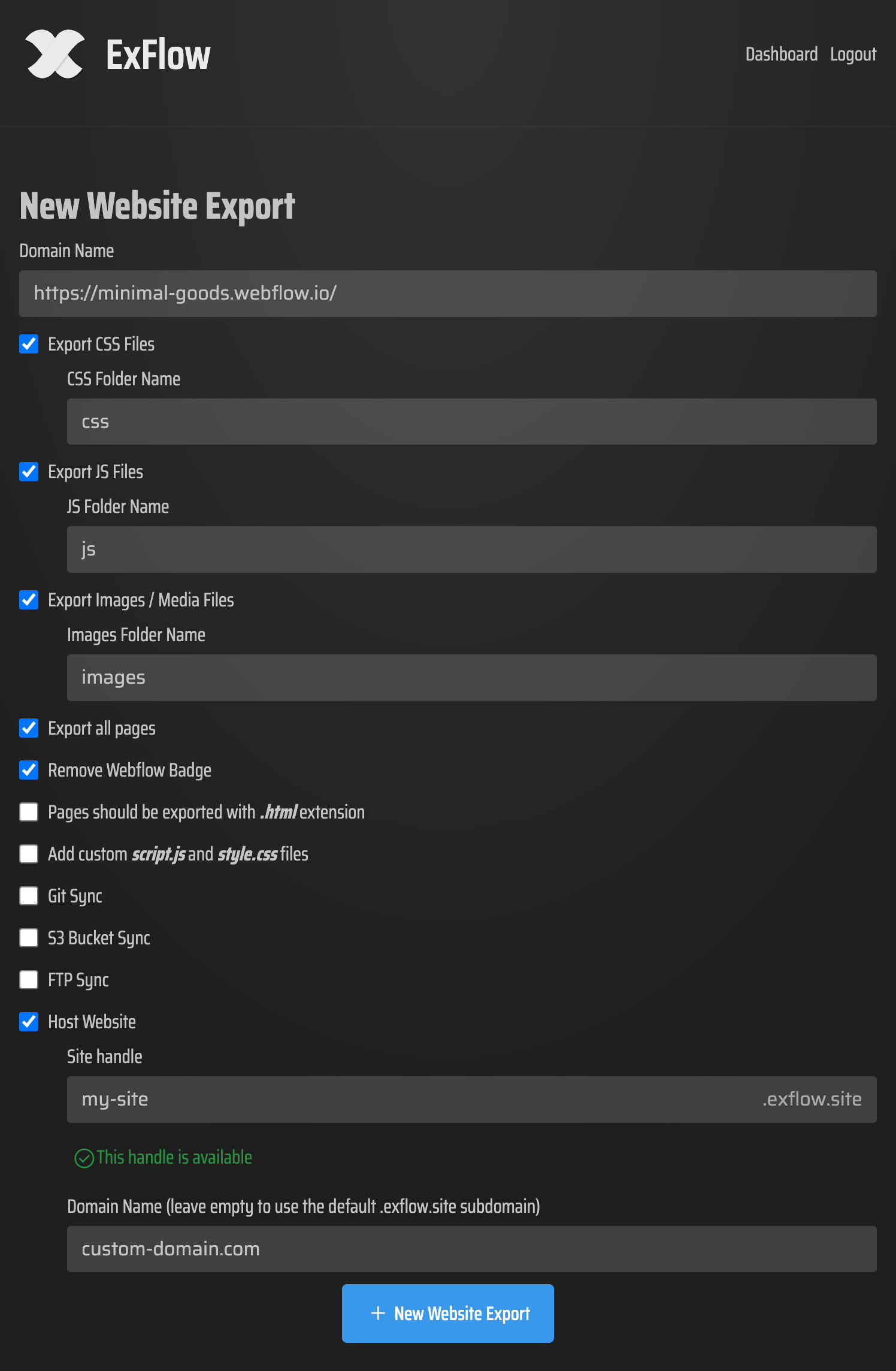
- Enter Your Site URL: Head over to ExFlow.site and paste the domain of the Webflow site you wish to export.
- Configure Your Settings: ExFlow gives you granular control. You can choose to export CSS, JS, and media files. Most importantly, make sure 'Export All Pages' is toggled on. This ensures your CMS items are captured.
- Remove the Badge: If you're looking for a professional finish, ExFlow can automatically remove the 'Made in Webflow' badge during the export process.
- Choose Your Destination: You can download the entire site as a ZIP folder, or better yet, sync it directly to a hosting provider. ExFlow supports Git, S3, and FTP syncing.
- Launch: Hit the export button and let ExFlow handle the heavy lifting. Within moments, you'll have a production-ready folder containing your entire site.
Why Self-Hosting Is a Game Changer
Moving away from Webflow's proprietary hosting doesn't just save you money (though saving $20-$50 per month per site is a huge win); it gives you back your freedom.
1. Massive Cost Savings
Webflow hosting is expensive because you are paying for the convenience of their CMS editor. By exporting to a static site, you can host your project on platforms like Cloudflare Pages, Netlify, or even ExFlow’s own optimized hosting for a fraction of the cost—often for free.
2. Superior Performance
Static sites are incredibly fast. Because there is no database to query, your pages load almost instantly. This is a massive boost for your SEO and user experience.
3. Backup and Security
When you download your Webflow site, you are creating a permanent backup. You are no longer reliant on a single platform to keep your business online. If you want to move from S3 to a traditional FTP server, you have the files to do so.
ExFlow vs. HTTrack: Why Modern Sites Need Better Tools
Many users try to use HTTrack to download Webflow sites. While HTTrack was a pioneer, it often fails with modern, JavaScript-heavy sites. It frequently misses CSS files, breaks interactions, and fails to correctly map the relative paths of images.
ExFlow was built to understand the modern web. It ensures that your animations remain fluid and your images are optimized. It’s the difference between a broken copy and a perfect replica.
Conclusion
Don't let hosting fees or export limitations hold your content hostage. Whether you need to backup your Webflow site, move to a more affordable hosting provider, or simply want more control over your files, ExFlow provides the most reliable way to export Webflow CMS pages without any coding knowledge.
Ready to take control of your website? Visit ExFlow today and see how easy it is to download and self-host your Webflow creations.