 ExFlow
Best HTTrack Alternatives for Exporting Webflow and Framer Websites
For over two decades, HTTrack has been the go-to utility for anyone looking to download a website for offline viewing. In the era of static HTML and simple CSS, it was a miracle tool. But the web has changed. If you have tried to download a Webflow site or export a Framer website using HTTrack recently, you’ve likely encountered broken animations, missing styles, or empty pages.
In this guide, we explore why traditional crawlers are failing and what the best HTTrack alternatives are in 2024 to help you achieve a perfect export and move toward self-hosting.

Why HTTrack Fails on Webflow and Framer
HTTrack works by following links and downloading the files it finds. However, modern platforms like Webflow and Framer don’t just serve static files; they rely heavily on JavaScript to render content dynamically.
When HTTrack attempts to crawl these sites, it often misses:
- Dynamic Interactions: Webflow’s interactions and Framer’s complex React-based animations often break because the crawler cannot execute the underlying scripts.
- CMS Content: Native exporters and simple crawlers often struggle to capture the full breadth of CMS-generated pages.
- Optimized Assets: Modern sites use lazy loading and responsive image sets that a basic crawler might ignore, resulting in a "broken" visual experience.
The Native Export Limitation
Many users think, "Why not just use the built-in export feature?" While Webflow does offer an export tool, it is often locked behind premium plans. Furthermore, it frequently excludes your CMS content and doesn't handle the automatic removal of "Made in Webflow" badges without manual code editing. For Framer users, the situation is even more restrictive, as the platform lacks a comprehensive "one-click" export to static HTML for self-hosting.
Top HTTrack Alternatives for 2024
If you are looking for a way to backup your Squarespace site or migrate away from expensive hosting, you need a specialized tool. Here are the top contenders:
- ExFlow: The most comprehensive tool specifically built for Webflow, Framer, and Squarespace.
- Cyotek WebCopy: A more modern version of HTTrack for Windows, though it still struggles with heavy JavaScript.
- SiteSucker (Mac): A great tool for simple sites, but often requires significant manual cleanup for modern frameworks.
ExFlow: The Specialized Solution for Full Site Exports
ExFlow stands out because it isn't a generic crawler. It is a dedicated engine designed to understand the architecture of modern site builders. Unlike HTTrack, ExFlow executes the necessary code to ensure that what you see in the designer is exactly what you get in your export.
Key features of ExFlow include:
- Full CMS Export: Automatically converts dynamic CMS pages into SEO-friendly static HTML.
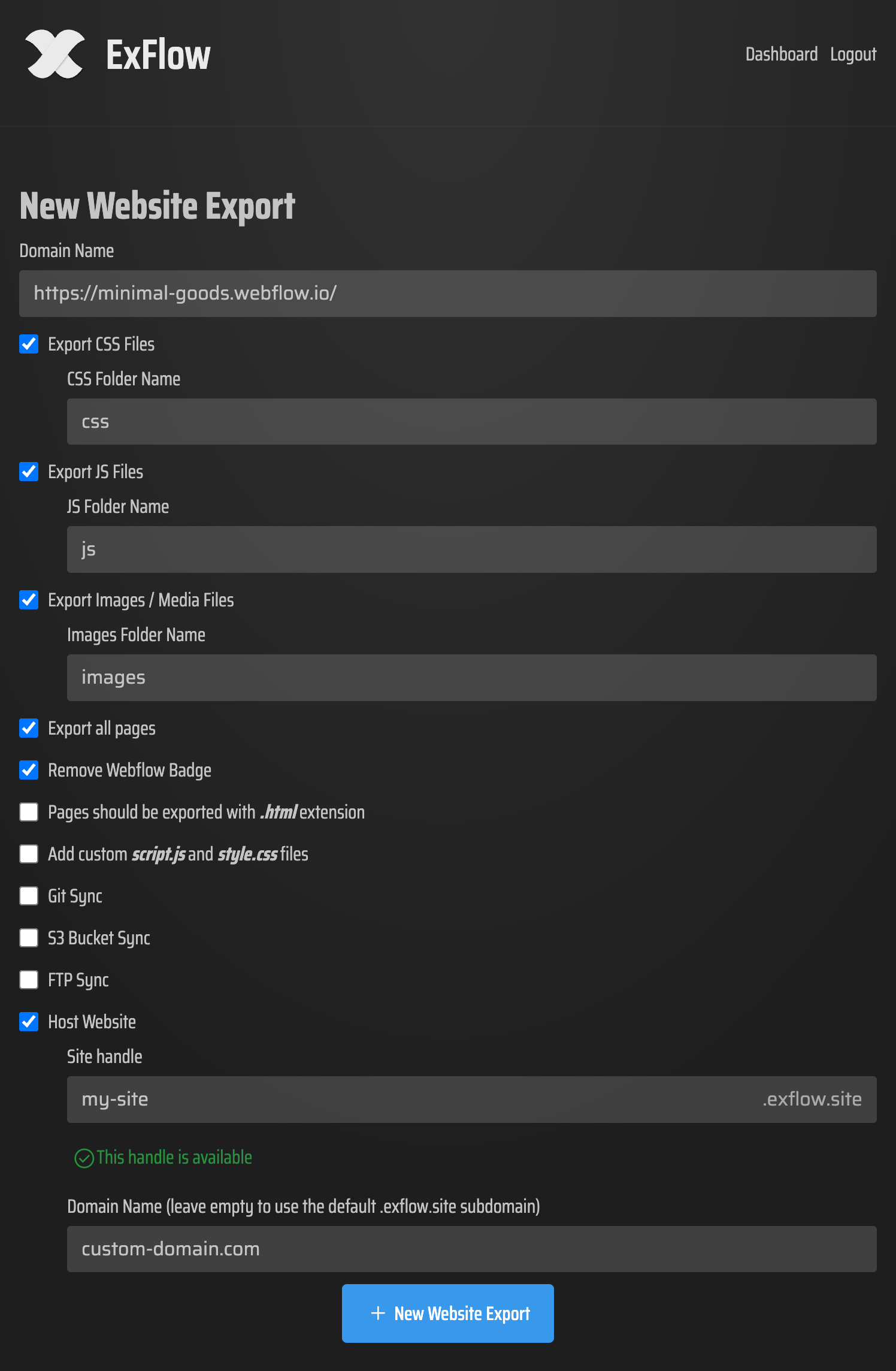
- Badge Removal: Automatically cleans up the code to remove platform branding.
- Asset Optimization: Gathers all CSS, JS, and media files into a clean, organized folder structure.
- Direct Sync: Supports automatic deployment to Git, S3, and FTP/SFTP.

How to Export and Self-Host in 3 Simple Steps
- Enter Your URL: Go to ExFlow.site and paste the domain of your Webflow, Framer, or Squarespace site.
- Configure Your Settings: Choose whether you want to remove the badge, add custom scripts, or set up a sync to your preferred hosting provider.
- Download or Deploy: Hit export. Within minutes, you’ll have a ZIP file ready for use, or your site will be live on your own servers.
Cost Savings and Performance Benefits
Why go through this effort? The most common reason is that Webflow hosting is expensive. For a simple portfolio or business site, paying $20-$30 per month can add up. By exporting your site to a static format, you can host it for pennies (or even for free) on providers like Cloudflare Pages or Netlify using ExFlow's unlimited hosting options.
Static sites are also inherently faster and more secure. There is no database to hack and no server-side processing to slow down your page loads.

Conclusion: Choosing the Right Tool for the Job
HTTrack had its time, but modern web design requires modern tools. If you want to export a Framer website or download a Webflow site without losing the magic of your animations and design, ExFlow is the clear winner. It bridges the gap between high-end design tools and cost-effective, independent hosting.
Stop overpaying for hosting and take control of your code today with ExFlow.