 ExFlow
ExFlow vs HTTrack: Why Your Webflow Export Keeps Breaking
Designing a stunning website in Webflow, Framer, or Squarespace is the easy part. The challenge begins when you see the monthly hosting bill. For many developers and business owners, the 'vendor lock-in' becomes a significant financial burden. Naturally, the first thought is: 'Can I just download the files and host them myself?'
Many turn to open-source tools like HTTrack to scrape their sites. However, if you've tried this, you likely ended up with a broken mess of missing styles, non-functional animations, and empty CMS pages. In this guide, we’ll explore why generic scrapers fail and how ExFlow provides the professional alternative you need.
The HTTrack Trap: Why Generic Scrapers Fail
HTTrack has been around since the late 90s. It was built for a web of static HTML files and simple directories. Modern site builders like Webflow and Framer are fundamentally different. They are essentially complex web applications that render content dynamically.
When HTTrack attempts to 'mirror' a Webflow site, it acts like a simple crawler. It looks for static links in the HTML and downloads the files they point to. But modern sites don't work that way. Much of the content is injected via JavaScript, and animations are triggered by complex event listeners that a simple crawler can't see or execute.
Technical Hurdles: Broken Animations and Missing CMS Content
1. The JavaScript Execution Gap
HTTrack does not execute JavaScript. If your site uses Webflow Interactions or Framer Motion, those scripts need to run in a real browser environment to determine which assets to load. Because HTTrack just looks at the raw code, it often misses the triggers that make your site feel premium. The result? A static, lifeless page where nothing moves.
2. The CMS Dilemma
This is the biggest pain point for most users. Webflow’s internal exporter (even on paid plans) often neglects CMS collections. When using a tool like HTTrack, the scraper sees the 'List' page but struggles to map the individual dynamic pages correctly. You might get the homepage, but your 50+ blog posts? They either don't download at all or come out as broken templates without the actual data.
3. Obfuscated Asset Paths
Modern platforms use Content Delivery Networks (CDNs) and complex URL structures to serve images and CSS. HTTrack often fails to rewrite these paths locally, meaning your 'downloaded' site is still trying to pull images from the original platform's servers. If you cancel your subscription, those images disappear, and your site breaks.
ExFlow: The Professional HTTrack Alternative
Unlike generic scrapers, ExFlow was built specifically for the architecture of Webflow, Framer, and Squarespace. It doesn't just 'scrape'—it exports. It understands how these platforms structure their data, ensuring that every asset, from the smallest icon to the largest CMS database entry, is captured perfectly.
Here is why ExFlow is the superior choice for your export needs:
- Full CMS Support: Unlike HTTrack, ExFlow handles dynamic content with ease, ensuring every blog post and portfolio item is exported as a functional HTML page.
- Perfect Animation Preservation: ExFlow captures the necessary JS and CSS to ensure your Webflow and Framer animations work exactly as they did on the original host.
- Badge Removal: Want to remove the 'Made in Webflow' or 'Framer' badge for a cleaner look? ExFlow does this automatically during the export process.
- Clean Code Export: The resulting code is organized, minified, and ready for self-hosting on any provider like Cloudflare, S3, or GitHub Pages.
Comparison: ExFlow vs. HTTrack
| Feature | HTTrack | ExFlow |
|---|---|---|
| Best for | Static 90s websites | Webflow, Framer, Squarespace |
| CMS Pages | Rarely works / Manual | Full Automatic Export |
| Animations | Often Broken | 100% Preserved |
| Setup | Complex Configuration | Simple URL Input |
| Badge Removal | No | Yes (Automatic) |
| Sync Options | Local Only | Git, FTP, S3, and Native Hosting |
How to Export Your Site Properly in 3 Steps
Stop fighting with broken scrapers. Here is the professional way to move your site:
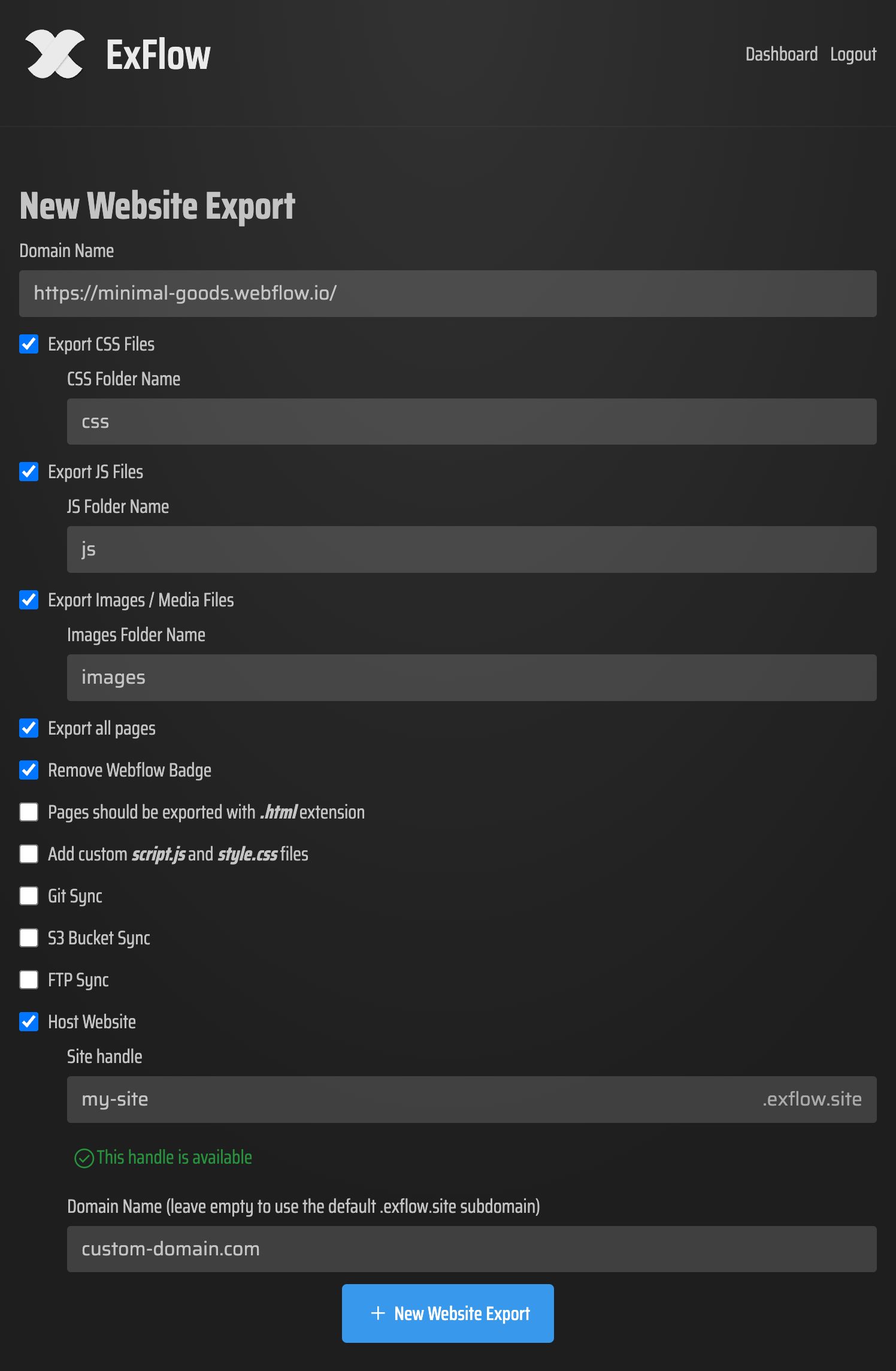
- Enter Your URL: Go to ExFlow and paste your site’s domain.
- Configure Your Export: Select whether you want to export all pages, remove the badge, or sync directly to a provider like GitHub.
- Download and Host: Once the process finishes, download your clean ZIP file or use ExFlow’s unlimited, inexpensive hosting for a one-click setup.
Conclusion: Professional Exports Without the Headache
While free tools like HTTrack are great for simple archiving, they are not suitable for professional site migration. If you are looking to self-host your Webflow site to save money or need a backup of your Squarespace site, you need a tool that respects the complexity of modern web design.
Don't settle for broken links and missing images. Use ExFlow today and take full control of your website's hosting and future.
Interested in learning more about saving on hosting? Check out our previous guide on why Webflow hosting is too expensive.