 ExFlow
Better Than HTTrack: Why ExFlow is the Best Way to Download Your Webflow Site
Designing a stunning website in Webflow is a joy, but the monthly hosting fees can quickly become a burden, especially for static sites or growing portfolios. For many, the first thought for saving costs is using a website crawler like HTTrack to download their site. However, if you've ever tried to download a Webflow site using generic tools, you know the results are often far from professional. From missing CMS data to broken animations, the 'free' route usually leads to hours of frustration.
Enter ExFlow, the specialized solution designed to bridge the gap between Webflow’s design power and the freedom of self-hosting. In this guide, we’ll explore why generic crawlers fail and how ExFlow provides a seamless, high-quality alternative.

The Problem with HTTrack and Webflow
HTTrack has been a staple for downloading websites for decades, but it was built for a simpler web. Modern platforms like Webflow use complex structures that generic crawlers struggle to interpret. Here are the most common issues when using HTTrack for Webflow:
1. Missing CMS Content
Webflow’s CMS (Content Management System) stores your blog posts, projects, and team members in a database. When a crawler like HTTrack visits your site, it only sees what is currently rendered on the page. It often misses dynamic links, paginated content, and the deep structure required to keep your blog functional. This makes it incredibly difficult to export Webflow CMS pages accurately.
2. Broken Animations and Interactions (IX2)
Webflow is famous for its Interactions 2.0 system. These animations rely on specific JavaScript initialization. When HTTrack downloads these files, it often breaks the relative paths or fails to trigger the scripts correctly, leaving you with a static, lifeless version of your original design.
3. Asset Bloat and Link Errors
HTTrack is notorious for creating 'messy' exports. You might find duplicate images, broken CSS paths, or absolute URLs that still point back to Webflow’s servers, preventing your site from being truly independent.
Why ExFlow is the Superior Alternative
Unlike HTTrack, ExFlow isn't a generic crawler. It is a dedicated engine built specifically for modern web builders like Webflow, Framer, and Squarespace. It understands the underlying architecture of these platforms, ensuring that your export is a pixel-perfect replica of your live site.
Key Benefits of ExFlow:
- Full CMS Export: ExFlow automatically traverses your collection lists and template pages, ensuring every blog post and portfolio item is captured as a clean HTML file.
- JavaScript & Animation Support: Our engine ensures that Webflow's IX2 and custom scripts are preserved and properly initialized in your exported code.
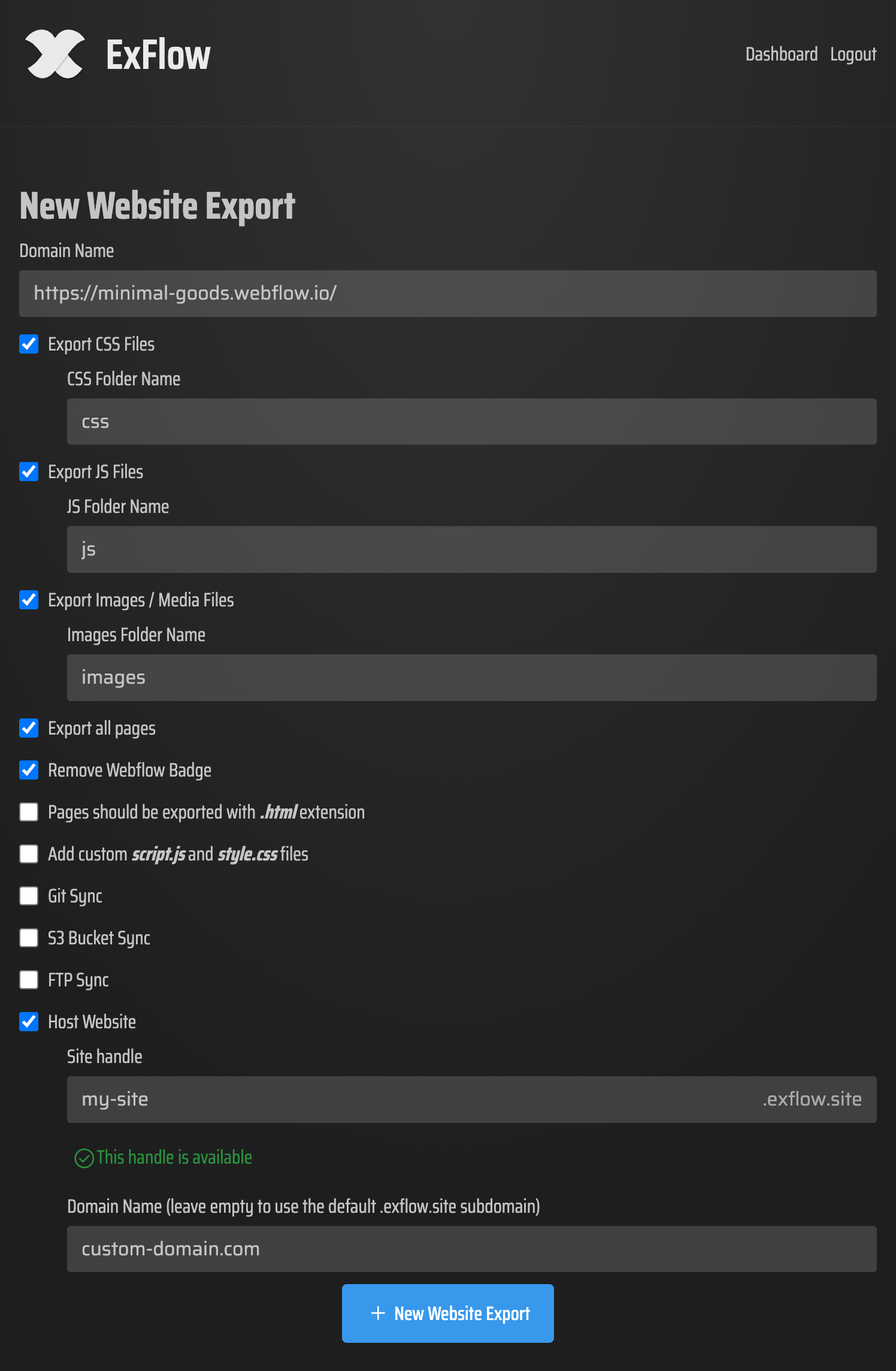
- Automatic Asset Optimization: ExFlow cleans up your file structure, organizes your images/CSS/JS folders, and ensures all links are relative and ready for self-hosting.
- Badge Removal: Clean up your brand by automatically removing the 'Made in Webflow' badge during the export process.

Step-by-Step: How to Export Your Webflow Site with ExFlow
Moving your site away from expensive hosting doesn't have to be a technical nightmare. Here is how you can use ExFlow to take control of your website in minutes:
- Enter Your URL: Visit ExFlow.site and paste the domain of your Webflow project.
- Configure Your Export: Choose your preferences, such as exporting all pages, removing the badge, and adding custom scripts if needed.
- Run the Export: ExFlow will scan your site, capturing all styles, scripts, and CMS content.
- Download and Host: Once finished, you'll receive a optimized ZIP file. You can then host this for free on platforms like Cloudflare Pages, or use ExFlow’s own inexpensive hosting for a one-click setup.
Beyond Simple Downloading: Syncing and Freedom
ExFlow goes further than just a one-time download. For professional workflows, we support automatic syncing with GitHub, FTP, and Amazon S3. This means you can keep designing in Webflow's world-class editor while automatically pushing updates to your own affordable hosting environment.
Whether you are looking for a HTTrack alternative because of failed exports or you simply want to stop paying expensive Webflow hosting, ExFlow provides the reliability and professional code quality you need.

Conclusion
Don't let your hard work be ruined by a broken crawler. If you want a functional, professional, and SEO-friendly version of your site that you can host anywhere, ExFlow is the clear choice. Save money, gain flexibility, and keep your site running exactly as you intended.
Ready to move your site? Try ExFlow for free today.