 ExFlow
How to Backup a Squarespace Website Locally and Host it Anywhere
Squarespace is a fantastic tool for building beautiful, professional websites. Its drag-and-drop interface and sleek templates make it a favorite for creatives and small businesses. However, as your site grows, you might start to feel the constraints of a "walled garden" platform. Whether it’s the rising cost of monthly subscriptions or the realization that you don't actually "own" your site's source code, many users eventually look for a way to break free.
But here is the catch: backing up a Squarespace website isn't as straightforward as you might think. If you’ve ever tried to "export" your site using Squarespace’s native tools, you likely ended up with a confusing XML file that’s mostly meant for WordPress. Your beautiful design, custom CSS, and high-resolution images? Often left behind or broken.
In this guide, we’ll explore how to create a true, full-site backup of your Squarespace website and how you can host it anywhere—saving money and gaining total control.
The Problem: Squarespace’s Native Export Limitations
Most users assume that the "Export" button in the Squarespace settings menu creates a complete copy of their website. Unfortunately, that’s far from the truth. Squarespace’s native export is primarily designed for migrating blog content to WordPress.
Here is what usually happens when you rely on the built-in export:
- Missing Media: Images are often exported as links rather than files. If you cancel your Squarespace subscription, those links break, and your images vanish.
- No Design Elements: Your custom CSS, styling, and layout configurations are not included in the XML file.
- Functional Gaps: Products, album pages, and event pages are frequently excluded.
- No "Restore" Feature: Squarespace does not offer a way to upload that export file back into a new Squarespace site to restore it to a previous state.

Essentially, the native export gives you the "skeleton" of your content but leaves the "soul" of your website behind. This is a major risk for anyone who values their digital assets. If you want to backup Squarespace properly, you need a solution that captures everything: the HTML, the CSS, the JavaScript, and every single image.
Why You Need a Local Backup
Relying solely on a SaaS platform like Squarespace means you are at the mercy of their uptime, their pricing changes, and their terms of service. Squarespace hosting is expensive, especially when you factor in the costs of e-commerce features or advanced blocks.
By having a local backup, you achieve:
- Data Sovereignty: You own your files. You can store them on your hard drive, a private server, or a cloud vault.
- Cost Efficiency: Once you have a static version of your site, you can host it for pennies on platforms like Amazon S3 or Cloudflare Pages.
- Peace of Mind: You are protected against accidental deletions or platform-wide outages.

Introducing ExFlow: The Ultimate Squarespace Exporter
If you’ve tried generic tools like HTTrack, you know they often struggle with modern, script-heavy platforms. This is where ExFlow changes the game. Unlike generic scrapers, ExFlow is specifically engineered to handle the complexities of Squarespace, Webflow, and Framer.
ExFlow doesn't just "scrape" your site; it performs a clean, full-site export that includes:
- All Pages: From your homepage to deep-nested CMS content.
- Clean Code: Optimized HTML, CSS, and JS files.
- Media Assets: Every image and video is downloaded and linked correctly for local use.
- Badge Removal: You can even choose to remove the "Powered by Squarespace" or "Made with Webflow" badges automatically.
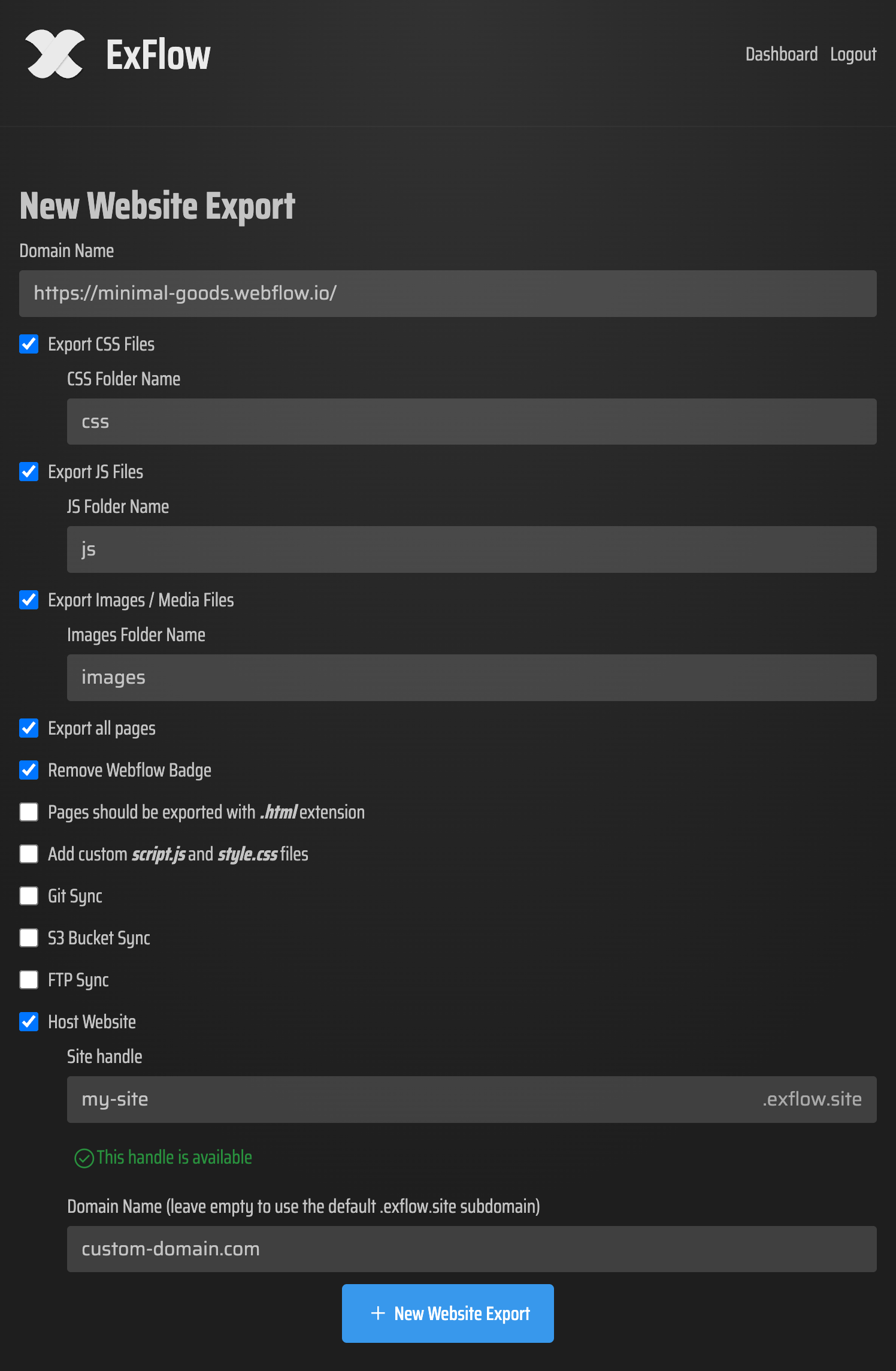
How to Backup Your Squarespace Website with ExFlow
The process is designed to be effortless, even if you aren't a developer. Here is the step-by-step:
- Enter Your URL: Go to ExFlow.site and paste your Squarespace domain.
- Configure Your Export: Choose whether you want to export all pages, remove badges, or add custom scripts. If your site is password-protected, ExFlow can handle that too—just provide the credentials.
- Run the Export: ExFlow will crawl your site, packaging every asset into a neat ZIP folder.
- Download: Once finished, you’ll have a complete, static version of your website ready for local storage or self-hosting.
How to Host Your Exported Site Anywhere
Once you have your files from ExFlow, the world is your oyster. You are no longer tied to Squarespace’s servers. Here are your best options for self-hosting Squarespace content:
1. ExFlow’s Built-in Hosting
For the easiest path, ExFlow offers its own hosting solution. It’s faster and significantly cheaper than standard Squarespace plans. You can link your custom domain and have your site live in seconds.
2. Amazon S3 or Google Cloud Storage
Static websites are incredibly cheap to host in "buckets." ExFlow even supports automatic syncing to S3. This is a "set it and forget it" solution for high-traffic sites that need to stay fast and affordable.
3. GitHub Pages
If you’re a fan of version control, you can use ExFlow’s Git Sync feature. Every time you update your site in Squarespace and run an export, the changes can be automatically pushed to your GitHub repository, which then deploys to GitHub Pages for free.

4. FTP Sync
Traditional hosting is still an option! If you have a standard web server, use the FTP Sync feature to upload your exported files directly.
Conclusion
Don't wait for a price hike or a service outage to realize you don't have a backup of your hard work. Whether you want to download a Squarespace site to save on hosting costs or simply want the security of a local copy, ExFlow provides the most reliable way to bridge the gap between SaaS platforms and true ownership.
Stop paying for features you don't use and take back control of your website today. Head over to ExFlow and see how easy it is to export Squarespace to HTML.