 ExFlow
How to Download Your Entire Squarespace Site and Stop Paying for Subscriptions
Squarespace is a fantastic tool for designers, but as your site grows, the recurring hosting costs can start to bite. Whether you are looking to cut down on monthly expenses or simply want to have a full offline backup of your hard work, knowing how to download your Squarespace website and host it yourself is a game-changer. In this guide, we will explore why you might want to leave the walled garden and how ExFlow makes the process seamless.
Why Stop Paying for Squarespace Hosting?
While Squarespace offers a polished all-in-one experience, it comes with significant trade-offs. The most obvious is the cost. Standard plans can run hundreds of dollars per year, which is a lot for a site that doesn't change every day. Beyond the price tag, there is the issue of ownership. When your site is tied to their platform, you are subject to their rules, their limits, and their downtime.

By choosing to self-host your Squarespace site, you gain:
- Immediate Cost Savings: Move to a free or low-cost static host like Cloudflare Pages or GitHub Pages.
- True Backups: Keep a local copy of every HTML, CSS, and image file.
- Total Control: Add custom scripts or server-side logic that Squarespace doesn't allow.
The Challenge with Traditional Tools (HTTrack)
Many users try to use generic tools like HTTrack to scrape their sites. However, modern platforms like Squarespace use complex JavaScript and dynamic loading that standard crawlers often miss. You might end up with broken layouts, missing images, or contact forms that simply don't work. This is where a specialized tool like ExFlow becomes essential.

How to Export Your Squarespace Website with ExFlow
ExFlow is designed specifically to handle the nuances of Squarespace, Webflow, and Framer. It doesn't just 'scrape' pages; it intelligently maps the site's structure to ensure everything—from your animations to your gallery blocks—is preserved.
Step 1: Enter Your URL
Visit ExFlow and enter your Squarespace domain. If your site is password-protected, don't worry—ExFlow can handle that as long as you provide the access credentials during the setup.
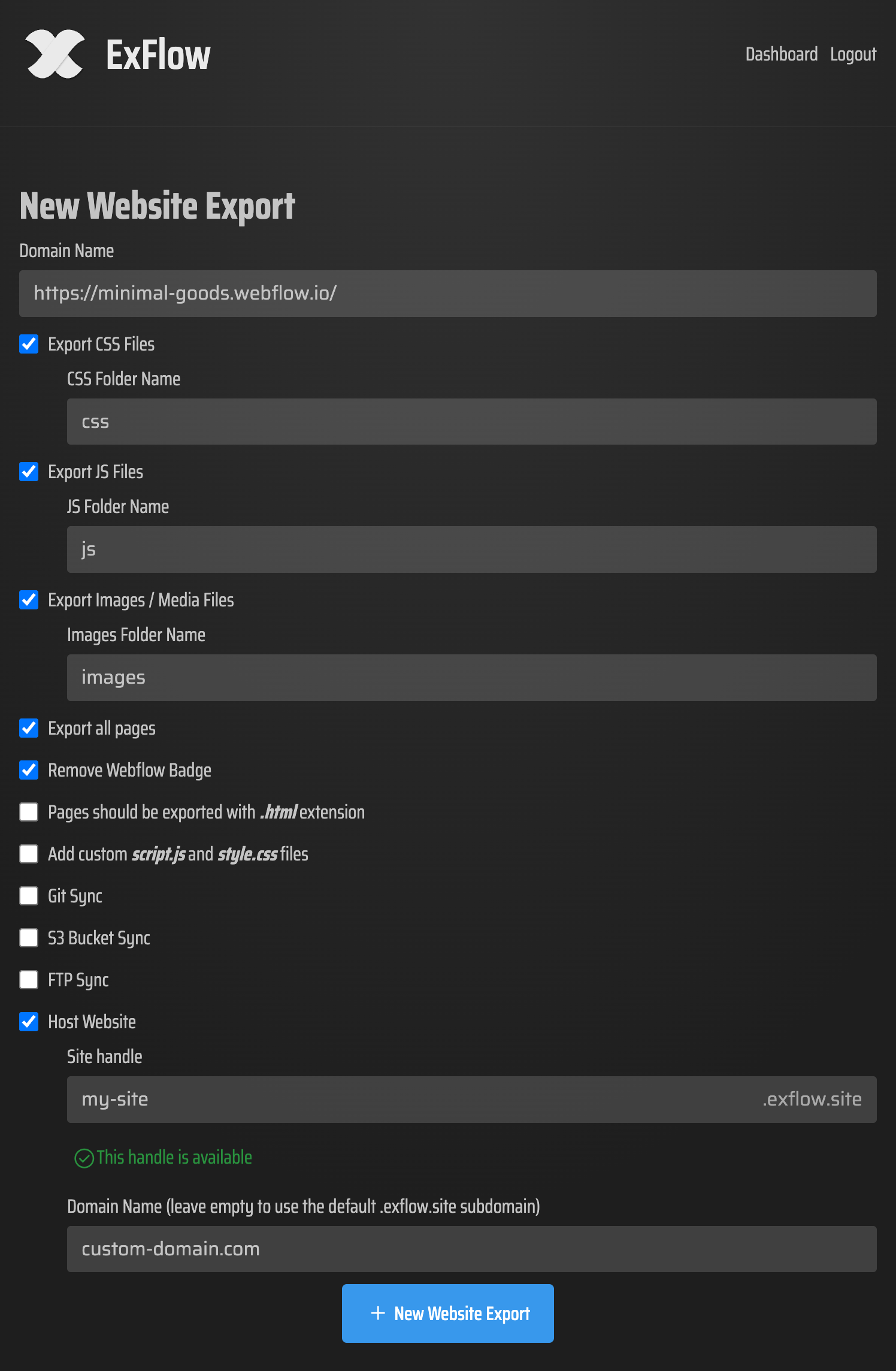
Step 2: Configure Your Export
You have full control over what gets downloaded. You can choose to:
- Export all CSS and JS files.
- Download every single image and media asset in full resolution.
- Remove the "Made with Squarespace" badge automatically.
- Add your own custom scripts for analytics or new features.
Step 3: Initiate and Download
Once you hit export, ExFlow goes to work. Within minutes, you will receive a ZIP folder containing a clean, optimized version of your site. All links are converted to relative paths, meaning you can open the index.html file on your computer and the site will look exactly as it did online.
Where to Host Your Exported Site?
Once you have your files, you are no longer tethered to Squarespace's billing department. You have several powerful (and often free) options:
- ExFlow Unlimited Hosting: For the ultimate convenience, you can host directly through ExFlow. It's built for these exports and offers unlimited bandwidth and custom domain support at a fraction of the cost of original platforms.
- Amazon S3: Perfect for those who want a robust, pay-as-you-go infrastructure. ExFlow can even sync your files directly to your S3 bucket.
- GitHub/Git Sync: If you are a developer or want version control, sync your export to a Git repository and deploy via Netlify or GitHub Pages.
- Traditional FTP: Have an existing hosting plan? Simply use FTP to upload your files to any server.

Conclusion
Moving away from Squarespace hosting doesn't mean you have to rebuild your site from scratch. By using ExFlow to export your Squarespace site, you keep the beautiful design you worked hard on while shedding the expensive monthly fees. It's the smartest way to gain ownership of your digital presence.
Ready to take control? Head over to ExFlow today and see how easy it is to download your entire site.